
Trigger · Confirmed sign-up
Welcome and onboarding
Explain the next step after a confirmed subscription, inquiry or purchase.
Connect customer information with relevant messages and a clear next action.
MTI Tech supports CRM setup, customer segmentation, email and SMS workflows, lifecycle planning and reporting. We help organize the journey from an initial inquiry or purchase to follow-up, service and retention—without treating every contact as eligible for every message.
Your CRM should help the team understand who the customer is, what has happened and what should happen next. Automation becomes more useful when the underlying records, events and permissions are clear.
A sequence built on incomplete or conflicting data can create confusion instead of better follow-up.
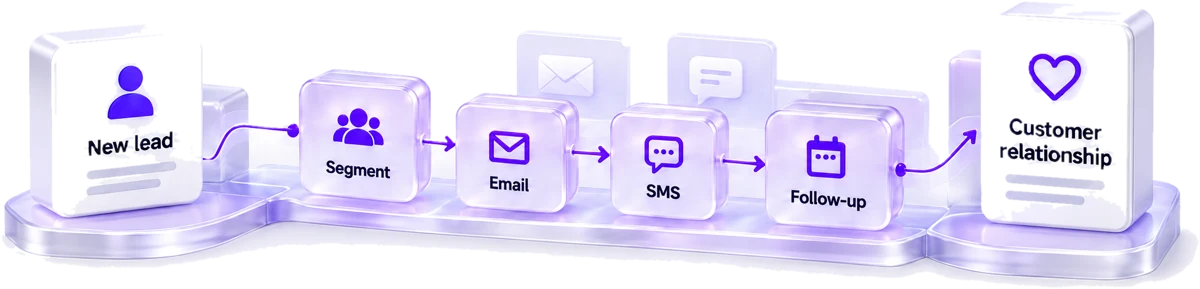
Explain the next step after a confirmed subscription, inquiry or purchase.
Provide relevant information and agreed post-purchase communication.
Assess whether an appropriate reminder can be sent, to whom and under which permissions.
Organize audiences around meaningful, available information rather than unreliable assumptions.
Review whether inactive customers should receive a suitable message, remain suppressed or be removed from a campaign audience.
Route tasks and reminders so customer requests have an owner.
Define the event that starts each workflow, the audience it includes, the conditions that stop it and the systems it updates. Check duplicate records, unsubscribes, suppression rules and timezone handling before broad activation.

Do not assume a platform connection automatically creates a lawful or appropriate messaging program. The business's consent requirements and current policies need to be reflected in the implementation.
Review normal cases and exceptions: a repeat purchaser, an unsubscribed contact, a duplicate record, a changed order status or a customer who has already completed the intended action.
A workflow should not continue sending a message after its purpose is no longer relevant.
Get the flow specs and 12 consent and suppression test cases →Track delivery and customer actions alongside the intended business outcome. Revenue attributed by a platform is not automatically revenue caused by a campaign.
AI-assisted drafting, classification or preparation may help certain tasks, but it does not remove the need for accurate records, approved messages or clear customer permissions. Use it where the benefit can be evaluated and the output reviewed.
AI & workflow automation →Feasibility depends on its data, access, integration options and required workflow. Confirm the specific platform during scoping.
No. Start with the journey where the data is usable and the customer need is clear.
No. Define the implementation and measurement plan, then evaluate actual customer and business outcomes.
Ownership, documentation and access arrangements should be stated in the proposal and handover.
Share your current CRM, the main follow-up problem and the events available in your system. We can discuss a focused improvement rather than adding disconnected campaigns. Planning your first flow? Read the CRM retention workflow guide. See the results for AL-Araf in our CRM automation case study.