

What is a Web Design Audit?
A Web Design Audit is a comprehensive evaluation of a website’s visual elements, functionality, and user experience (UX). Unlike a standard content audit, it uses both quantitative data (metrics) and qualitative data (user feedback) to identify why a site may be losing traffic or failing to convert.
In simple words, a Web Design Audit is a thorough study of your website to determine its effectiveness, aesthetically pleasing design, functionality, and alignment with your company’s present and future goals. This can be compared to an online brand health check. The audit finds problems and sets targets to improve its overall health, much like a medical examination.
Why Does Your Website Need a Design and SEO Audit?
A website may not achieve its desired rankings due to a variety of errors relating to UI/UX or SEO that slow down its overall success.These problems may affect your rankings or visibility in search engines or other features of your site, which can reduce its performance.
This is why a website design or SEO audit is essential. These inspections help you identify usability problems, technical SEO issues, mobile responsiveness gaps, and content-related weaknesses. By uncovering these hidden challenges, you can improve user experience, attract more organic traffic, strengthen your online presence, and ensure your website performs at its full potential.
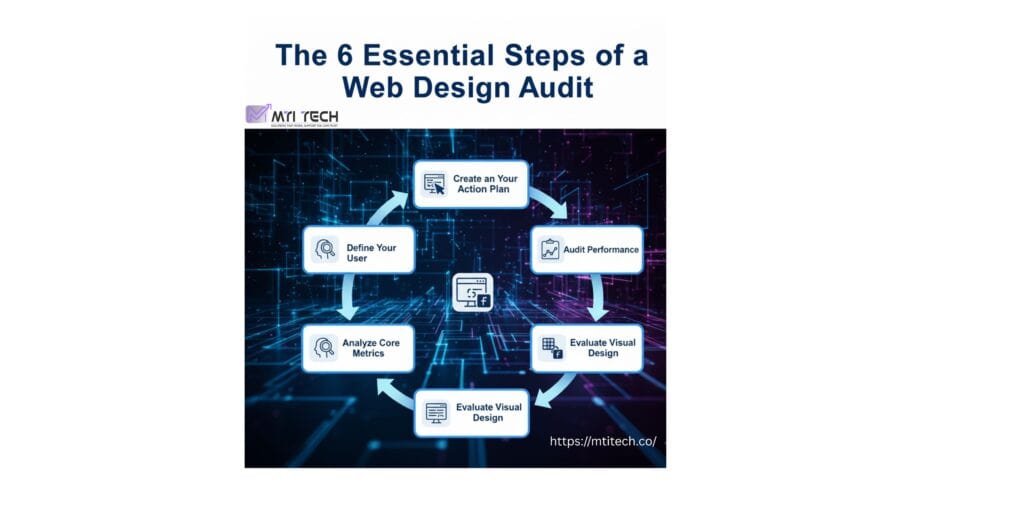
The 6 Essential Steps of a Web Design Audit
A design audit of a website breaks down the elements to ensure everything works smoothly and looks professional. Below are the six essential steps that guide this process.
- Define Your User: Define your user by identifying the target audience your website is structured to serve. Does it fulfill their needs, goals, and challenges? This helps you create a site that meets their expectations.
- Analyze Core Metrics: Analyze key performance metrics such as user engagement, site speed, and conversion rates to accurately check out the strengths and weaknesses of your website’s overall performance.
- Test Usability: Check out the website’s usability by thoroughly evaluating its navigation structure, content readability, and overall user interactions to determine whether visitors are able to complete tasks in an efficient and intuitive manner.
- Evaluate Visual Design: Check out whether the overall visual design is clean, consistent with the brand identity, and easy for users to understand. Make sure colors, fonts, spacing, and layout elements align with the brand and create a clear, professional experience.
- Performance: Check how fast the website loads, make sure it works smoothly on mobile devices, and confirm it follows accessibility rules (WCAG) so everyone can use it comfortably.
- Action Plan: Identify the most critical issues, address them in order of impact, and validate improvements through A/B testing to make sure effective results.

Detailed Audit Guide
1. Understand Your User
A design audit starts with understanding your users. Update User Personas (Ideal Customer Profiles) to accurately reflect your audience’s goals, motivations, and behaviors. A clear understanding of your users makes it easier to assess if it meets their needs.
- Key Question: Is the current design actually solving the problems users are facing?
- Action: Use on-site surveys to ask users directly about their goals and obstacles.
2. Review Metrics & KPIs
Before you dive deep in the examination, check your main metrics first. Look at your analytics to spot things like high bounce rates, pages where users drop off, or places where conversions are low. These ‘leaks’ show you where people are getting stuck or losing interest. Focus on those trouble areas instead of reviewing every page you’ll save time and make changes that matter.
- What to track: Bounce rates, high exit pages, and conversion drops.
- Pro Tip: If your product page conversion is dropping, focus your energy there first.
3. Assess Usability (UX)
When you start your web design audit, check how easy the website is to use. It might look good, but if people can’t find what they need or complete simple tasks, the UI/UX isn’t doing its job. Click through the main parts of the site like sign-ups, forms, menus, or checkout and see how the experience feels. Pay attention to anything confusing, slow, or annoying. The idea is to understand how smooth the site is for real users.
- Navigation: Is it consistent across all pages?
- Functionality: Do all forms, checkout flows, and login buttons work without error?
- Tools: Use session replays (recordings of user screens) to spot “Rage Clicks” where users click repeatedly out of frustration.
4. Analyze Visual Design
Do a visual checkup of your website’s look and feel. Is it aesthetically new, clean, and managed on all the site’s pages? Is it representative of your brand correctly? These are minor factors that have the potential to either make or break your business among the users. The idea is to understand how smooth the site is for real users.
- Consistency: Are fonts, colors, and imagery cohesive?
- Clarity: Is the typography easy to read on all devices?
- Heatmaps: Use zone-based heatmaps to see if users are actually looking at your hero images or ignoring them completely.
5. Check Accessibility & Performance
Always ensure that your website works smoothly on all devices, including desktops, laptops, tablets, and mobile devices. No one wants to abandon the site because it took several minutes to load on the user’s phone.
- Speed: Use tools like PageSpeed Insights to check load times.
- Mobile-First: Verify the site automatically resizes correctly for tablets and phones.
- Accessibility: Ensure the site meets WCAG standards (e.g., readable contrast ratios) so it is usable for everyone.
6. Review Results & Take Action
Now’s the time to pull your data together and decide on your next steps. Based on all the information you’ve gathered and analyzed, decide as a team which elements to keep, cut, or revise.
Don’t just collect data, fix the problems.
-
Prioritize: Separate issues into “Critical Fixes” vs. “Nice-to-Haves.”
-
Test: Don’t guess the solution. Use A/B testing to validate that your new creation actually performs better than the old one.
Frequently Asked Questions (FAQ)
When should I conduct a web design audit?
You should conduct it annually, or specifically when you notice a drop in conversion rates, before a major rebranding, or when preparing for a website redesign.
Why is a web design audit important?
It identifies the “invisible” friction points that hurt user experience. By fixing bugs and inconsistencies, you build brand trust, improve SEO rankings, and increase conversion rates.
What is the difference between quantitative and qualitative data in an audit?
- Quantitative data tells you what is happening (e.g., “50% of users leave this page”).
- Qualitative data tells you why it is happening (e.g., User feedback saying “I couldn’t find the checkout button”).
Don’t have time to run a 6-step audit yourself? We’ll do a preliminary audit for you. Click here to book your Free Web Design Audit with Mtitech
Slug: 6-step-website-audit-frameworkMeta Description: Learn how to conduct a comprehensive Web Design Audit in 2026 with our 6-step framework. Improve UX, boost SEO rankings, and fix conversion leaks today.